TC-01 : A Bedside Thought Catcher Capturing Ideas Without Opening Your Phone

Updated: Jun 27
My best ideas have almost always chosen to come to me when I am about to sleep!
I don't know if a lot of you face this issue, but most ideas come to you when you are about to sleep. I don't know if it's something to do with your body going into the alpha state or if it's just the most optimal conditions for ideas, but it surely is an issue.
Because when I get up to open my phone and jot down the idea, I end up doom scrolling and checking for all the other most random and unnecessary updates my phone would have sent me.
If I ignore the thought and go to sleep, it’s usually gone by morning. Over time, this became a frustrating nightly pattern: ideas vs sleep, and I was always losing one of them.
Hence, I built the 'Thought Catcher' - a small physical device that lets me capture thoughts without opening a screen.

Phones as the Biggest Enemies
Phones have been proven to be the worst things ever. Well, actually not, but they have their own set of disadvantages. Honestly, using the phone at night is just bad.

At night, the goal is mental closure. You don’t want to engage with information; you want to offload it and rest. Phones do the opposite:
Bright screens
Infinite choices
Notifications
Social gravity
Even when kept far from the bed (which I actually try to do), reaching for a phone breaks the fragile “almost asleep” mental state. I didn’t need a better notes app. I needed a different way of taking notes, especially the ones at night.
The Thought Catcher (TC-01)
The TC-01 is a small (the prototype is huge) screenless and harmless device that rests on my bedside table. It does one thing:
It catches thoughts when my brain is loud and lets me go back to sleep.

How do I use it? Super simple:
Press the button once.
Speak whatever is on your mind (idea, task, reminder).
Press the button again.
Hear a short beep = the thought is saved.
No screen. No notifications. No confirmation prompts. Just a button, a microphone, and sound-based feedback.
What Happens After You Speak? Magic!
Inside my Notion database, each entry gets:
Categorised as Idea, Task, or Note
A summary-style title inferred from the full transcript
A few relevant keywords
Urgency detection (for tasks)
A timestamp of when it was captured


The next morning, everything I would have forgotten is now noted, summarised, and organised. No half-written sleepy notes.
I don’t have to think about structure when the idea arrives. Just speak and zzzzzzzzzz.....
Alternate Use Cases
The Thought Catcher can be placed anywhere. You can have multiple catchers in places like your workplace, living room, and, god forbid, even in the bathroom!
Offload tasks and thoughts right after waking up before checking messages or emails.
Capture ideas or reminders while brushing teeth, without touching a wet or distracting phone.
A shared Thought Catcher in the living room that logs ideas or tasks with timestamps and voices.
But its primary design intent remains clear: Late-night, low-energy, low-friction capture.
What Happens Inside the Thought Catcher?
For those interested in the technical side, here’s a brief overview:
Hardware
Raspberry Pi 5 (the brain)
Physical button
Microphone (audio capture)
Buzzer (non-visual feedback)

Software
Whisper.cpp for offline speech-to-text
Python for:
- Intent inference
- Categorisation (idea / task / note)
- Title generation
- Keyword and urgency detection
Notion API for syncing
Continuous loop architecture; the code keeps running and catching thoughts!
Bonus: I get an optional daily and weekly progress email that mentions the ideas and tasks I uploaded that day/week!

The Making Process (From Idea to TC-01)
Problem Identification - Losing ideas at night or losing sleep to my phone became the core problem to design around.
Defined the interaction - first decided the process: press → speak → press → beep.
Quick hardware prototyping - Used a Raspberry Pi 5, a button, mic, and a buzzer to test the experience without worrying about bulk.
Built the software in layers - Started with basic recording → added offline transcription → then intent inference → finally Notion integration and email.
Iterated on software - Most iteration went into how the system interprets messy human speech into usable tasks and ideas.
3D modelling for enclosure experiments - Rough enclosures were modelled to explore bedside presence, button placement, and hand feel. A lot of remodelling and making was done to finally create a working button and housing.
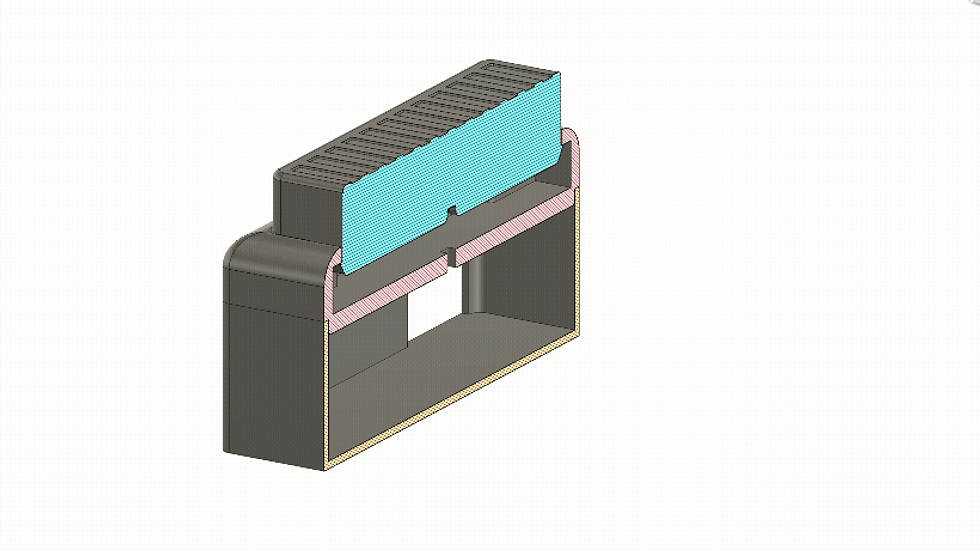

Testing in real conditions - Used TC-01 at night, in the dark—where small friction points immediately became obvious.
User testing - asked people to try it out without giving them much context. Made necessary changes based on feedback.
Chose functional clarity over polish, knowing this is a first iteration (TC-01), not a final product!
Important Design Decisions
The simplicity of this device lies in a bunch of very intentional choices:
Designed for a mental state - This device is to be used at night, pre-sleep when you are half awake but the mind is in full swing. Everything about the device is tuned for minimal stimulation and minimal cognitive load.
Clarity - The confirmation beep creates a strong sense of reliability and lets the user know that what they intended to do has been done without overstimulating.
Button and not only voice operated - You can always use an Alexa or Google Home device. But with concerns of privacy, it’s honestly scary knowing that someone is listening to everything going on. It’s also impossible to create a voice-operated device that does not hear everything happening (that's the whole point). Hence, a button ensures privacy and a sense of security.
One button - No unnecessary learning curve and super simple user interaction. The device is made for when you're almost asleep, and the last thing someone in this state would want to do is search for the right button.
Only speak - No additional user input ensures ease of use and keeps the user experience minimal. The fewer decisions you have to make at night, the easier it is to stay calm and return to sleep.
Quiet & smart - The device quietly categorises entries (Idea/Task/Note), infers urgency, creates a summary title, adds keywords, and timestamps uploads — but none of that interrupts the user right before they are going to sleep.
Interaction as the Focus
As a product design student, I have learnt a lot about how users function, and for us, the user is GOD. Hence, I naturally obsess over the interaction.
It’s about intentional interaction — removing screens where they don’t need to exist and designing technology that respects human attention, energy, and context.
I'm sure you could be like, just use your phone. Well, the phone can do anything and everything. The TC-01 can't do everything. But it exists because of the side effects phones create.

Key Takeaways
The best design interventions don’t add features; they curate and add what is essential and remove anything that's unnecessary.
I learnt a lot from this simple yet fun project, and I think you can also learn from the following:
Remove decisions the user must take. The fewer choices, the higher the follow-through.
Trust beats accuracy when the goal is relief. Don't confuse the user. Provide all necessary feedback and signifiers (don't go overboard though).
Keep context in mind and design for context. In this project, the bedside table was pre-decided, and that helped in framing the interaction.
Use computational power in the background. You can turn the simplest inputs into mind-blowing outputs using offline as well as online computation.
End interactions deliberately. A clear stop prevents spirals, loops, and accidents.
Objects can hold intention better than apps. Physical presence anchors behaviour in ways software alone rarely does.
Design for misuse, not just ideal use. Your product should work in the worst of cases.
What Next?
The TC-01 is the first child. It's surely still a part of an experiment, and there are tons of improvements and changes that have to be made. Now that the core experience feels right, there are a few clear directions I want to push next:
Size and Form
The current prototype uses a Raspberry Pi 5, which makes the device bulkier than it needs to be. It was used for quick and easy prototyping but can be reduced to something much smaller and possibly a lighter and simpler micro-controller. The form can also be made to feel in place when kept on a bedside table. Things like:
Material - wood would create a warm and natural feel.
Form - softer edges and a smaller profile.
Stability - it can be given rubber grippers and slightly flatter for a more stable look and feel.

Computational Power
The interpretations and inferencing can be made much smarter using better code, either offline or also using other LLMs like OpenAI and Google Gemini for more detailed, human-like inferencing. Interpretation can be more nuanced - especially for messy, emotional, or multi-part thoughts.
Feedback and Interaction
There’s also room to experiment with how the device communicates the interaction and inculcates trust - whether through different sound patterns, haptics, or even subtle physical cues, without increasing stimulation or distraction.
Other Contexts
The same concept and principles can be translated to different contexts and use cases as briefly discussed earlier.
The Thought Catcher began as a simple fix for my dumb problem, but I see it as something that many people could put to use.
What surprised me is how little “tech” it actually needed — just a calm, reliable ritual: press, speak, beep, done. No screen, no temptation, no spiral.
Hope to take this forward and would love feedback, ideas, or suggestions (especially on making the language understanding smarter).
Happy to share code or the circuit if people are interested!




soi cầu xsmb mình thấy bạn bè nói nhiều quá nên rảnh rỗi vào nghía thử cho biết. Mình không đọc kỹ nội dung đâu, chủ yếu xem giao diện có dễ nhìn không thôi. Vừa vào là thấy trang chia khối khá rõ, khoảng trắng vừa đủ nên mắt đỡ bị ngợp. Mấy phần dữ liệu họ để dạng bảng theo cột nhìn gọn, kéo nhanh vẫn theo kịp mà không bị rối. Cái mình thích là menu để ngay chỗ dễ thấy, bấm qua lại vài mục không phải tìm vòng vòng. Nói chung cảm giác kiểu ai mới vào cũng biết nên nhìn chỗ nào trước, vì các block nội dung tách bạch và menu điều hướng…
https://xosoplus.mobi/soi-cau-lat-lien-tuc.html mình lướt thấy bạn bè nhắc nên bấm vào coi thử cho biết, kiểu tò mò giao diện thôi chứ mình cũng không phải dân soi cầu gì. Vào trang thấy họ chia mục XSMB theo ngày nên nhìn cái là biết đang ở phần nào, đỡ phải mò. Mình để ý nhất là danh sách lô tô: bấm vào từng số là nó nhảy ra thống kê cầu cụ thể, tiện hơn nhiều so với tự ngồi dò tay. Mà họ tô màu cam/xanh để phân biệt nên mắt bắt nhanh, nhất là lúc kéo xuống dưới xem bảng kết quả. Nói chung bố cục dạng khối với bảng số xếp cột khá gọn, danh sách lô tô…
ball88.blog mình ghé thử đúng kiểu lướt cho biết thôi vì thấy mọi người nhắc, chứ mình không tạo tài khoản hay bấm chơi gì. Vào trang cái thấy giao diện khá hiện đại, nhìn “thoáng” chứ không bị nhồi chữ. Mình để ý họ giới thiệu là có tích hợp hơn 20.000 trò nên ban đầu tưởng sẽ rối, ai dè cách chia mục lại khá dễ theo dõi. Mấy tiêu đề đặt rõ ràng, kéo xuống tới đâu biết đang đọc phần nào tới đó, không phải căng mắt tìm. Menu cũng nằm chỗ dễ thấy nên chuyển qua lại mượt, không bị lạc. Nói chung cảm giác họ sắp nội dung theo từng block gọn gàng, chữ…
thapcam tv mới dạo này mình thấy có người nhắc tới khi nói về các nền tảng giải trí trực tuyến nên cũng thử mở vào xem cách họ bố trí giao diện ra sao. Mình không đi sâu vào nội dung hay từng trò cụ thể, mà chủ yếu quan sát cách các chuyên mục được phân chia trên trang và cách thông tin hiển thị cho người dùng. Nhìn tổng thể thì các khu như thể thao, casino, game bài hay slot thường được sắp xếp theo từng nhóm khá rõ, hiển thị dạng khối và danh sách nên lướt qua cũng dễ theo dõi. Các bảng dữ liệu được trình bày dạng cột khá gọn, giúp quan…
hit club mình thấy dạo này nhiều người nhắc nên cũng ghé thử cho biết thôi. Vào cái là thấy giao diện khá sáng sủa, kiểu chia khối rõ ràng nên lướt nhanh không bị rối. Mình không đăng ký hay chơi gì, chỉ xem phần giới thiệu với mấy mục thông tin họ đặt trên trang. Có đoạn nói về bảo mật SSL 256-bit để khá dễ thấy, đọc lướt là hiểu họ muốn trấn an người dùng kiểu gì. Menu cũng nằm ngay chỗ quen mắt, bấm qua lại giữa các mục không phải mò lâu. Nói chung cảm giác họ sắp xếp nội dung theo nhóm ổn, chữ không dày đặc nên nhìn đỡ mệt, nhất là…